- Exercises: Upload the current status at the end of each session.
- Semester project: Upload your shape generator or drawing tool until SUN | 21.12. | 23:59.
- Documentation: Upload the documentation until SUN | 08.03. | 23:59 and send me a mail with the link and the Modulbescheinigungen / Bewertungsprotokolle.
About
Wie sieht algorithmische Gestaltung aus? Welche Tools prägen unsere gestalterische Praxis? Wann wird Gestaltung interaktiv? Und welche Formen kann eine digitale Publikation annehmen? Die Digitalen Grundlagen bieten einen Einblick in die digitalen Dimensionen gestalterischer Praxis. Im Zentrum steht die Auseinandersetzung mit Design-Systemen, Tools und Interaktion. Dabei lernen wir gestalterische Prozesse mithilfe von Code, Algorithmen und Parametern systematisch wie auch experimentell zu denken und umzusetzen.
Wir erforschen den Umgang mit digitalen Tools – von klassischer Software über KI-gestützte Systeme bis hin zu selbst entwickelten Web-Anwendungen. Außerdem beschäftigen wir uns mit Interfaces und Interaktivität im Web und untersuchen Typografie im digitalen Raum. Im Rahmen von Übungen, Workshops und kollaborativen Formaten erproben wir unterschiedliche technische und gestalterische Methoden. Die Einführung ins Gestalten mit Code eröffnet dabei nicht nur neue Möglichkeiten, sondern lässt bewusst Raum für Bugs, Glitches und Zufall als Teil des kreativen Prozesses.
Theoretische Inputs – etwa zu Plattform-Ökonomie, Open Source oder Cyberfeminismus – eröffnen Perspektiven auf gesellschaftliche Fragen unserer digitalen Realität. Ziel ist es, die Potenziale von Vernetzung und Personalisierung gestalterisch zu erkunden und zugleich Phänomene wie Filter-Bubbles, Bias in KI oder Automatisierung zu hinterfragen – um digitale Technologien nicht nur zu nutzen, sondern kritisch zu reflektieren und mitzugestalten.
Bringt bitte einen Computer mit.
Daten
MONDAY
10:00–11:00 Tutorium
13:00–13:45 Lunch
13:45–17:00 Basics
17:00–19:00 Stammtisch
TUESDAY
09:00–12:00 Basics
12:00–13:00 Lunch
15:15–18:00 Basics
WEDNESDAY
10:00–12:00 Basics
12:00–13:00 Lunch
13:00–16:00 Basics
DEADLINES
Exercises: Upload the current status at the end of each session.
Semester project: Upload the digital drawing tool until SUN | 25.01. | 23:59.
Documentation: Upload the documentation until SUN | 08.03.
20.10.–22.10.*
03.11.–05.11.
17.11.–19.11.
01.12.–03.12.
15.12.–17.12.
12.01.–14.01.
26.01.–28.01.
02.02.–04.02.*
* shared start / end together with Luzia Rux
Assignment
Exercises:
In the first sessions, we’ll start with small exercises to experiment with systematic design methods, by
creating analog and digital shapes. We’ll also get to know the basics of coding (HTML / CSS / JS) on the
way. Upload photos and screenshots of the created shapes as well as the code from the exercises at the end
of each session.
Semester project:
Eventually, the assignment is to create your own digital drawing tool or shape generator. You can build upon
the previous exercises to make shapes interactive or variable. What parameters can you change? What does the
form react to?
Documentation:
As a documentation, create a website that showcases each session through photos / screenshots, embedded /
linked code and personal reflections.
DEADLINES
Create a digital drawing tool or shape generator. What forms can you create with it? What parameters can you change? How does the user interact with it?
Documentation
Create a website that showcases each session. How do you navigate to the different pages? How does you documentation look like? Is it chaotic like a thought process or organized and systematic?
DOCUMENTATION
For the documentation, create a website that showcases each session through photos / screenshots, embedded / linked code and personal reflections.
For the documentation, create a website that showcases each session through photos / screenshots, embedded / linked code and personal reflections.
HOW TO DOCUMENT
- Exercise
- Idea
- Reflection (what worked well, what didn’t)
- Scans / Screenshots / Video
- Link to Code (we’ll upload our code to Github pages soon)
WHAT TO DOCUMENT
Document all exercises and assignments you made in the course (see list of tasks below).
Document all exercises and assignments you made in the course (see list of tasks below).
- 1.1. Drawing Algorithms
-
- Exercise: Drawing Algorithms
- Exercise: Text Systems
- Exercise: CSS Drawings
- 1.2. Variables & Parameters
-
- Exercise: Morphological Box
- Exercise: The Magic Triangle
- 1.3. Grids & Modules
-
- Exercise: Grid-construction
- Exercise: Grid-based type design
- Exercise: CSS Grids
- 1.4. Digital Drawing Tools
-
- Assignment: Digital drawing tools
- 1.5. Tools & Print
-
- Assignment: Riso printing
DEADLINES
- Documentation: Upload the documentation until SUN | 08.03. | 23:59 and send me a mail with the link and the Modulbescheinigungen / Bewertungsprotokolle.
Texts & Research
- Sol LeWitt
- [Sol LeWitt: A Wall Drawing Retrospective | MASS MoCA]
- [Using ChatGPT to implement Sol LeWitt’s Wall Drawings]
- The Handmade Web
- [Podcast: HTML energy]
- [A Handmade Web – J.R. Carpenter]
- [Laurel Schwulst’s Decade in Internet – RHIZOME]
- Design Systems
- [Programme entwerfen – von Karl Gerstner, Erstausgabe erschienen bei Niggli, 1963.]
- [Book: Are visual systems a new thing? | Flexible Visual Systems – Martin Lorenz]
- [Book: Parameterize | Form+Code – Casey Reas et al. ]
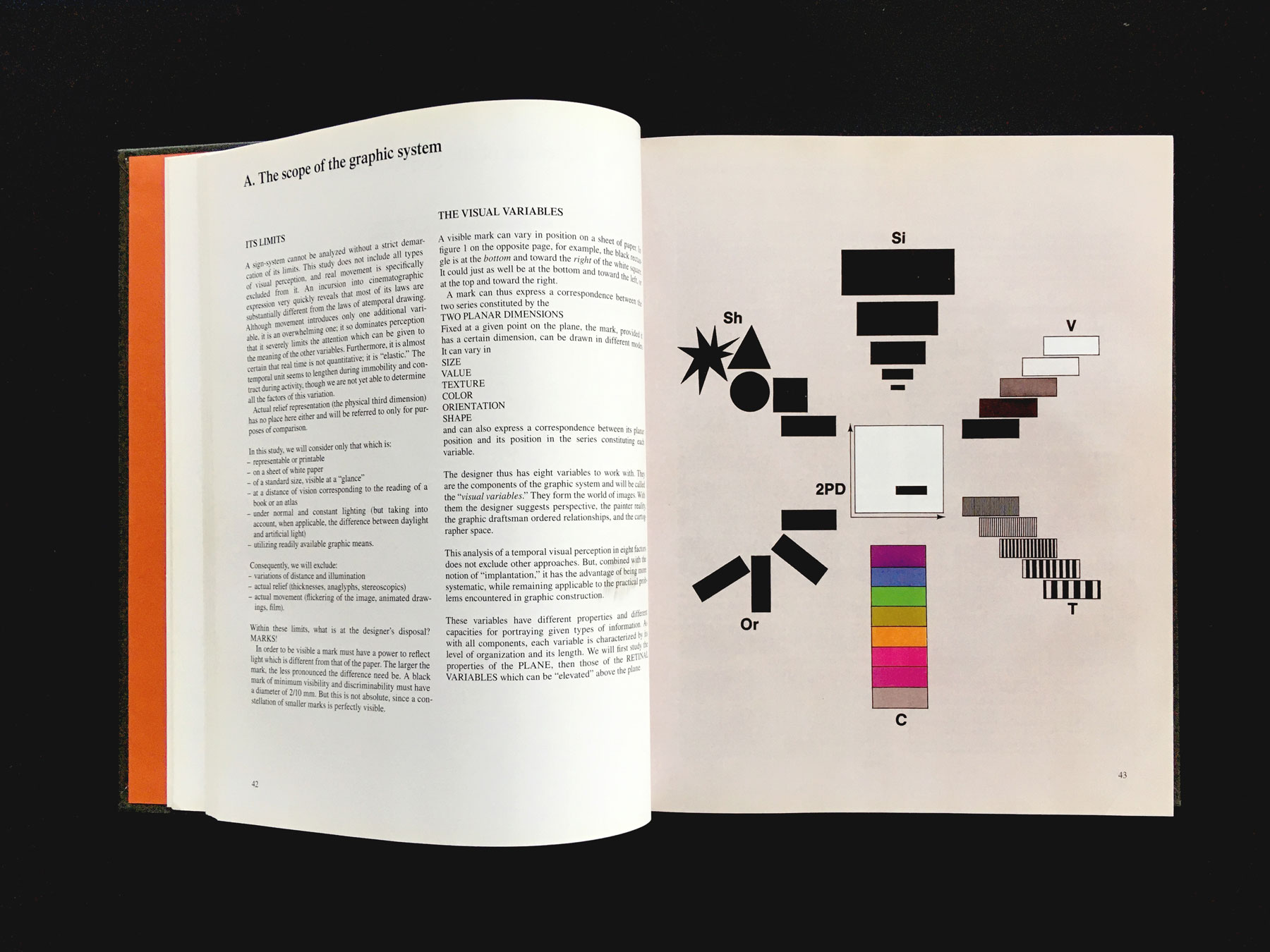
- Creativity Methods
- [The Morphological Box by Fritz Zwicky]
- Out of the Box with Karl Gerstner
- [A Box for Flexible Visual Systems]
- [The Magic Triangle]
- [Book: Nea Machina – Thomas & Martin Poschauko]
- Grid Systems
- [Grid Systems in Graphic Design – Josef Müller-Brockmann, 1981]
- [References: The Gridded Section – Palace of Typographic Masonry]
- [Grids as Transformational Tools | Flexible Visual Systems – Martin Lorenz]
- [Mind Walks – Karl Nawrot | Drawings w/ Stencils & Stamps]
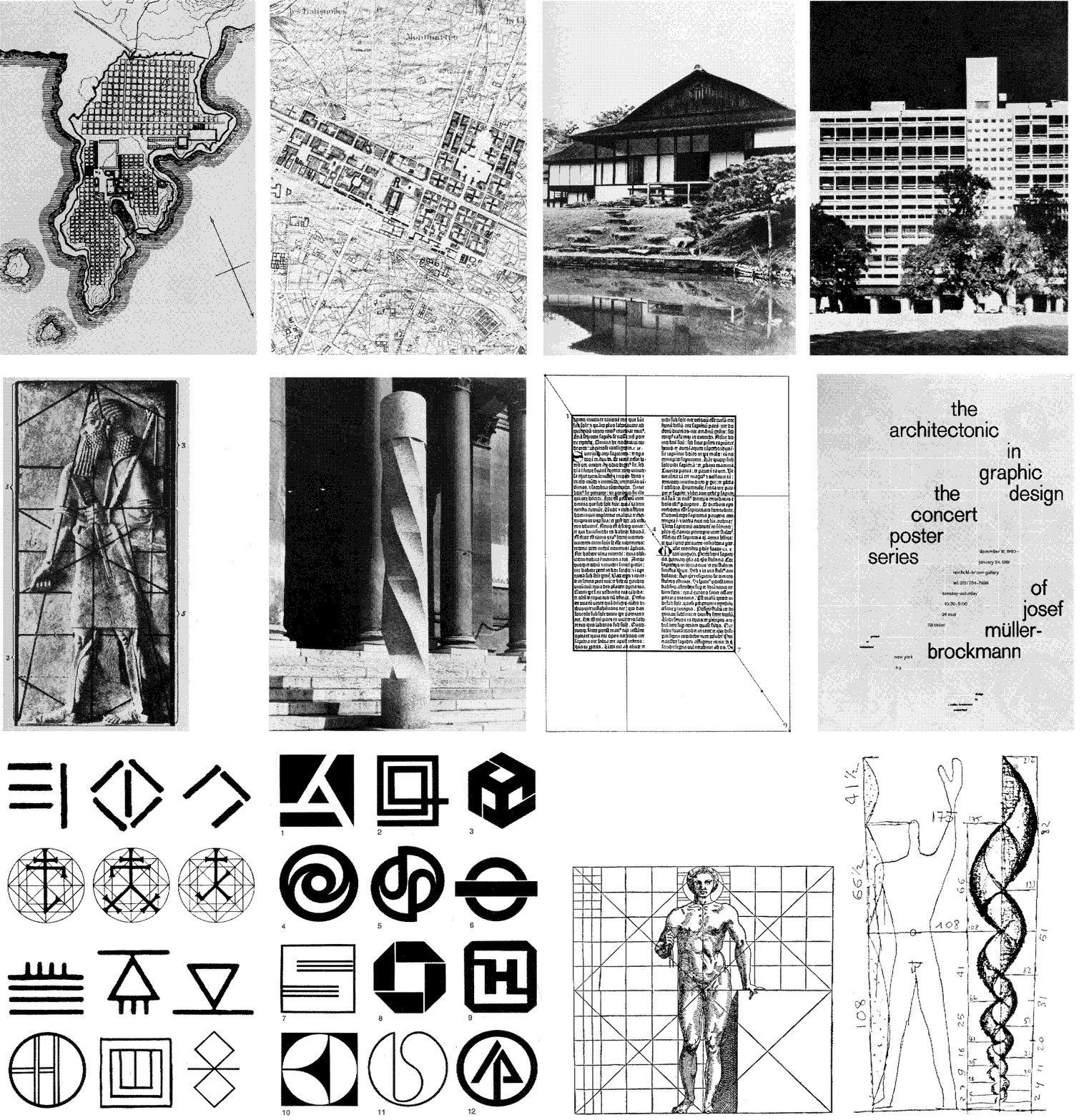
Where to start
Depending on your experience and preference, there are different points to start from:
-
HTML Boilerplate
if you want to start a sketch from scratch, start with this empty HTML / CSS / JS files
[Github: 00. HTML Boilerplate]
[Codesandbox: HTML Boilerplate] -
Starter Kits
if you want to start from modifying existing code, choose one of the coding starter kits
[Github: All Starter Kits]
[Codesandbox: 01. Individual Paths / HTML]
[Codesandbox: 02. Designing Programs / CSS]
[Codesandbox: 03. CSS Flower / CSS]
[Codesandbox: 04. Responsive Design / CSS]
[Codesandbox: 05. Animations / CSS]
[Codesandbox: 06. Interactions / JS]
[Codesandbox: 07. Shape Slider / JS]
[Codesandbox: 08. Grid Selection / JS]
[Codesandbox: 09. Drawing with p5.js / JS]
Coding Resources
- HTML
-
[References: HTML
elements]
[Video: Basics of HTML by Laurel Schwulst]
[Web Essentials: HTML / CSS Einführung]
[CodeAcademy: Learn HTML tutorial]
- CSS I
-
[References: CSS properties]
[Video: Basics of CSS by Laurel Schwulst]
[CodeAcademy: Learn CSS tutorial]
- CSS II
-
[References: CSS Media
Queries]
[References: CSS Animations]
[CodeAcademy: Learn indermediate CSS]
- CSS Positioning
-
[Video: CSS Positioning]
- CSS Flexbox
-
[Video: CSS Flexbox]
[References: A guide to flexbox]
[Game: Flexbox Froggy]
- CSS Grid
-
[Video: CSS Grid]
[References: CSS Grid]
[Game: CSS Grid Garden]
- ChatGPT
- [ChatGPT: Study Mode]
- [Research: ChatGPT May Be Eroding Critical Thinking Skills]
- [Research: Gen AI Makes People More Productive and Less Motivated]
Tips for using ChatGPT
- Learn the basics first – without ChatGPT. You can only evaluate generated code, if you can read and understand it. Try things out and make mistakes.
- Learn how to debug independently. Read documentation, search Google/Stackoverflow, ask peers, log & inspect. Debugging is an important skill that has to be practiced.
- Ask for explanations instead of solutions. e.g. “Explain JS loops for a five-year old.”, “Can you guide me step by step with questions instead of just giving me the answer?”, “Give me three options with pros / cons, without implementing it. ”, “Can you give me hints about this error code, but don’t fix my code yet?”.
- Don’t blindly trust AI, reflect on bias and ethical implications. see [AI Myths] or [Data Feminism – Catherine D'Ignazio, Lauren F. Klein].
Contact
-
Chat
Here you can chat and ask questions.
Slack -
GoogleDrive
you can find the library and the starter kits here
GoogleDrive
-
NextCloud
for uploading (assignments etc.) we use NextCloud [see Slack for URL]
-
Sign-Up for Coding Support / Consultations
consultations in case you need support with a coding problem or want to talk about your concept a bit longer
GoogleDoc -
Contact
Katharina Nejdl
katharina.nejdl@googlemail.com
1.1. Drawing Algorithms
Monday 03.11.
Schedule subject to change, depending on group vibe. We can also agree on shorter days or cut some
inputs. Let’s discuss!
13:45–16:00
13:45–14:00 | Intro
- Check-In (name, pronouns, mood)
- Course-Info
- Topic-Info
- Feelings & Code on paper / in the room
14:00–15:00 | Input: Sol LeWitt
Wall Drawing #46
- Vertical lines, not straight, not touching, covering the wall evenly.
Wall Drawing #797
- The first drafter has a black marker and makes an irregular horizontal line near the top of the wall. Then the second drafter tries to copy it (without touching it) using a red marker. The third drafter does the same, using a yellow marker. The fourth drafter does the same using a blue marker. Then the second drafter followed by the third and fourth copies the last line drawn until the bottom of the wall is reached.
Wall Drawing #295
- Six
whitegeometric figures (outlines) superimposed on ablackwall. - [Geometric figures: circle, square, triangle, rectangles, trapezoids, parallelograms]
Further Readings
15:00–16:00 | Exercise: Drawing Algorithms
- → groups of 2
- → document all image / text versions
- draw an abstract shape [without showing it to your partner]
- write a description on how to draw the shape
- let your partner draw the shape from the description
- if the shape doesn’t match your drawing, change the description until it does
16:00–18:00
16:00–16:15 | Setup
- Folder structure
Visual Studio Code Editor [Download]
- open folder in VS Code
-
create index.html
→ write / select HTML5 structure - open HTML page in browser
- edit, save & reload
Cheat Sheet: HTML
[Video: Basics of HTML by Laurel
Schwulst]
[Web Essentials: HTML / CSS Einführung]
[References: HTML elements]
[CodeAcademy: Learn HTML tutorial]
[Web Essentials: HTML / CSS Einführung]
[References: HTML elements]
[CodeAcademy: Learn HTML tutorial]
- file setup
- structure: html, body, main, nav, ...
- head (meta, title, css), js
- HTML boilerplate
- syntax
<tag> content </tag>
- hypertext
<a href="http://link.com" target="_blank"> This is the hyperspace. </a>
- tags
16:15–18:00 | Input: HTML
Create an index.html page and try out different tags. As a text you can use your drawing
algorithm
from this morning.
18:00–19:00
18:00–19:00 | Stammtisch
- Presentation & discussion
- Showcases & suggestions
Art References
Reading List
- Podcast: HTML energy
- A Handmade Web – J.R. Carpenter
- Laurel Schwulst’s Decade in Internet – RHIZOME
- Game: Stille Post in Bildern
- Check-out
Tuesday 04.11.
09:00–12:00
09:00–09:15 | Intro
- Check-In
09:15–10:00 | Reading: Designing Systems
-
[Programme entwerfen – von Karl Gerstner]
Erstausgabe erschienen bei Niggli, 1963.
- → groups of 2-3
- → read & discuss one program [30min]
- → present program to group [15min]
10:00–10:15 | Setup II
- Inspection
- VS Extensions [Live-Server] [Prettier]
Cheat Sheet: CSS I
[Video: Basics of CSS by Laurel
Schwulst]
[References: CSS properties]
[CodeAcademy: Learn CSS tutorial]
[References: CSS properties]
[CodeAcademy: Learn CSS tutorial]
- HTML Recap
- syntax
                            div {

                              color: red;

} - where?
- inline
- inside style tag
- external css file
- .classes & #ids
<div id="subtitle" class="text"> Some content inside. </div>
- properties
10:15–12:00 | Exercise: Text Systems
Download the starterkit and add css styling to the different text elements.
15:15–18:00
15:15–18:00 | Exercise: Text Systems
Download the starterkit and add css styling to the different text elements.
Wednesday 05.11.
10:00–12:00
10:00–10:15 | Intro
- Check-In
-
Pick & sketch a shape
(a face, an object, a room etc.)
10:15–12:00 | Exercise: CSS Drawings
Pick a shape and try to recreate it in HTML & CSS.
(e.g. a face, an object, a room etc.)
Showcases
13:00–16:00
Cheat Sheet: CSS II
[References: A
guide to flexbox]
[Game: Flexbox froggy]
[CodeAcademy: Learn indermediate CSS]
[Game: Flexbox froggy]
[CodeAcademy: Learn indermediate CSS]
- HTML / CSS Recap
- media queries
when the browser is smaller than 800px (mobile / tablet):
.element {
font-size: 18px;
}
}
.element {
font-size: 25px;
}
}@media (hover: none){
.element:hover {
color: inherit;
}
} - advanced positioning
- flex-box
[Video: CSS Flexbox in 100 Seconds]
[Reference: A Complete Guide to Flexbox] - css-grid
[Video: Build a Classic Layout FAST in CSS Grid]
[Reference: A Complete Guide to Grid]
- flex-box
- css-variables
                            :root {

                              --gapS: 5px;

                              --gapM: 10px;

                              --gapL: 20px;


                              --highlightColor: #0000FF;

                            }


                            .element{

                              color: var(--highlightColor);

                              margin: var(--gapS);

} - display
display: block;
}
.hidden {
display: none;
} - transformation
                            .element {

                                transform: translate(50%, 50%);

                            }
.element {
transform: translate(50%, 50%) rotateX(-12deg);
} - transition & animation
                            .element {

                                width: 200px;

                                transition: width 0.3s ease;

                            }


                            .element:hover {

                                width: 500px;

                            }
width: 200px;
color: red;
transition: width 0.3s, color 0.5s;
}
.element:hover {
width: 500px;
color: blue;
}
13:00–15:00 | Exercise: CSS Drawings
Pick a shape and try to recreate it in HTML & CSS.
(e.g. a face, an object, a room etc.)
15:00–16:00 | Plenum
- Document & Upload
- Present
- Check-out
1.2. Variables & Parameters
Monday17.11.
13:45–17:00
13:45–14:00 | Intro
- Check-In
Readings
- [Book: Are visual systems a new thing? | Flexible Visual Systems – Martin Lorenz]
- [Book: Parameterize | Form+Code – Casey Reas et al. ]
- [Book: Nea Machina – Thomas & Martin Poschauko]
- [Programme entwerfen – Karl Gerstner]
14:00–15:30 | Exercise: Morphological Box
- Make your own morphological box:
- Pick three parameters, like shape, amount and color.
- Then pick three values for each of the parameters, for example: Shape: Circle, Triangle, and Square / Amounts: 3, 6, and 9 / Color: Red, Green, and Blue
- Pick one of each parameter and combine them to create a shape. Repeat this until you have nine designs.
Further Readings:
[Flexible Visual Systems – Martin Lorenz]
15:30–17:00 | Exercise: The Magic Triangle
- Pick three parameters and produce ten designs. The parameters could be a color scheme, a type of (image) material, and a tool that helps you to cut out the (image) material. Which tool you use is completely up to you. You can use scissors, you can tear them up by hand, you can use photoshop or processing.
17:00–19:00
17:00–19:00 | Stammtisch
- Presentation & discussion
- Showcases & suggestions
Reading List
- [Discourse: Weltentwerfen – Einordnung von Design Systemen in den politischen Kontext]
- Book: Nea Machina – Thomas & Martin Poschauko
- Game: Creating posters together (adding layer only)
- Game: Association drawings
- Check-out
Tuesday 18.11.
09:00–12:00
09:00–09:15 | Intro
- Check-In
- ChatGPT
09:15–12:00 | Exercise: Form follows interaction
Add variables to your CSS shape. How can the user interact or change the parameters?
Debugging
- Is your syntax correct? Check your browser’s console.
- Error messages are your friends. Read them carefully, because usually they tell you where the problem is.
- The console.log() is your friend. Log everything to make sure you have the right element / value / etc.
- Try to run your code step by step (optimally logging all of them), to make sure things you think are working are actually working and to isolate the bug.
- Did you save? Is your live-server working?
- Try inspecting, googling or ask a friend.
Cheat Sheet: JS I
[References: JS
intro]
[CodeAcademy: Introduction to Javascript]
[CodeAcademy: Introduction to Javascript]
- where?
- inline
- inside script tag
- external js file
- logging
console.log('hi');
- variables
modern JS: const / let
                        const message = 'hello';

                        console.log(message);
console.log(counter);
counter = counter + 1;
console.log(counter);var message = 'hello';
console.log(message);
var counter = 1;
console.log(counter);
counter = counter + 1;
console.log(counter); - data types
const string = '1';
const boolean = false;
- get elements by Id / className / ...
                        const logo = document.getElementById('logo');

const text = document.getElementsByClassName('text')[0]; - change style / class with JS
change style in JS:
logo.style.backgroundColor = 'blue';
logo.classList.add('hidden');let root = document.documentElement;
root.style.setProperty('--highlightColor', 'red'); - timeout function
                        setTimeout(function(){

                            console.log('Finally here!');

}, 500); - innerHTML
                        const heading = document.getElementById('heading');


heading.innerHTML = 'New Heading'; - eventListener: CLICK
in JS:
logo.addEventListener('click', function(){
console.log('the user clicked on the logo');
})
<button onclick="myFunction()"> Click me! </button> - eventListener: MOUSEMOVE / TOUCHMOVE
mousemove (desktop):
document.body.addEventListener('mousemove', function(e){
const mouseX = e.clientX;
const mouseY = e.clientY;
console.log(mouseX, mouseY);
circle.style.top = mouseX + 'px';
circle.style.left = mouseY + 'px';
})
document.body.addEventListener('touchmove', function(e){
const touch = e.touches[0];
const touchX = touch.clientX;
const touchY = touch.clientY;
console.log(touchX, touchY);
circle.style.top = touchX + 'px';
circle.style.left = touchY + 'px';
})const root = document.documentElement;
document.body.addEventListener("mousemove", e => {
root.style.setProperty('--mouse-x', e.clientX + 'px');
root.style.setProperty('--mouse-y', e.clientY + 'px');
});
15:15–18:00
15:15–18:00 | Exercise: Form follows interaction
Add variables to your CSS shape. How can the user interact or change the parameters?
Cheat Sheet: JS II
[References: JS Guide]
[CodeAcademy: Learn intermediate javascript]
[CodeAcademy: Learn intermediate javascript]
- functions
console.log('Hello World!');
}
logHello();function logSomething(params) {
console.log(params);
}
logSomething('Ciao World!'); - if / else
if(number < 5){
console.log('smaller than five');
} if else (number === 5) {
console.log('equals five');
} else {
console.log('higher than five or undefined');
} - arrays
                            const fruits = ['banana', 'apple', 'pear'];

                            console.log(fruits[0]);
const textElements = document.getElementsByClassName('text');
console.log(textElements[0]); - for loops
- for loop
                                for (i = 0; i < 10; i++) {

                                    // do something

                                }
const fruits = ['banana', 'apple', 'pear'];
for (i = 0; i < fruits.length; i++) {
const fruit = fruits[i];
console.log(i);
console.log(fruit);
} - for...of loop
                                const fruits = ['banana', 'apple', 'pear'];


                                for (const fruit of fruits) {

                                    console.log(fruit);

                                }
[Reference: for...of vs. for-loop]
[Reference: forEach vs. for...in vs. for-loop] - for loop
- objects
const person = {
firstName: "Jane",
lastName: "Doe",
age: 25,
eyeColor: "brown"
}; console.log(person.firstName); - JS libraries
Wednesday 19.11.
10:00–12:00
10:00–10:30 | Intro
- Check-In
Expectation-Managment
-
Simple Complicated
Process Output
Prototype Code Perfect Wireframes / Design
Fun Frustration
10:30–12:00 | Wireframing
-
Draw a wireframe of a tool. [5min for each
round]
- My tool is a ... generator. A generator for visuals, posters, illustrations, type, words etc.
- It is a tool for ... me / us / kids / professionals / ...
- The tool makes ... easier / harder. everything / one specific thing / drawing / decisions / ideas / working / napping ...
- What shape(s) do you see on the website? Do you see typography or a photo, do you see simple shapes (circle, square, triangle) or complex ones (organic, fractal, composite), do you see a brush or a grid?
- What variables does the tool have? / What rules does the shape follow? Try sketching the logic (e.g., "if x then y") alongside the shape. Is the rule visible to the user or hidden behind the form?
- How can I change the shape? What is the role of the user? Does it respond to sliders, user input, time of day, random chance, sensor data, or network activity? Is it generative, interactive, participatory? Is the user a co-creator, a manipulator, or just a spectator?
- How does the shape look on mobile / desktop?
- What emotions, associations, or references does the tool create? What does it communicate? Does it feel playful, chaotic, meditative, structured?
- What is the role of randomness vs. control? Which parts are deterministic and which are unpredictable?
-
What happens when the shape breaks the rules?
Imagine a glitch, error, or exception in the algorithm.
How does the wireframe represent failure, randomness, or overflow?
-
→ One-Sentence-Concepts
13:00–16:00
13:00–15:00 | Input: Creative coding with p5.js
Download the starterkit and try to change the code. Read the documentation if you want to
know more about p5.js.
References
- [p5.js Examples]
- [p5.js References]
- [Codeacademy: Learn p5.js]
- [Youtube: The Coding Train / P5.JS]
- [Youtube: Creative Coding with Patt Vira]
- [p5.js: Tim Rodenbroeker Courses]
Debugging
- Is your syntax correct? Check your browser’s console.
- Error messages are your friends. Read them carefully, because usually they tell you where the problem is.
- The console.log() is your friend. Log everything to make sure you have the right element / value / etc.
- Try to run your code step by step (optimally logging all of them), to make sure things you think are working are actually working and to isolate the bug.
- Did you save? Is your live-server working?
- Try inspecting, googling or ask a friend.
15:00–16:00 | Plenum
- Document & Upload
- Present
- Check-out
1.3. Grids & Modules
Monday01.12.
13:45–17:00
13:45–14:00 | Intro
- Check-In
Readings
14:00–15:30 | Input: Analyse Grids
- Collect and analyse grids:
- Find grids in your environment (print, web, architecture, nature, etc.) and document them (photo, sketch, screenshot, etc.).
15:30–17:00 | Exercise: Grid-construction
- Create your own grids, stencils or modular shapes:
- What are they based on?
- What’s the level of complexity?
- What are the variables and parameters?
- Is it based in the analog or digital?
17:00–19:00
17:00–19:00 | Stammtisch
- Prepare grids for laser-cutting?
- Presentation & discussion
- Showcases & suggestions
- Cooking: Creating edible stamps & grids
- Games: Flexbox Froggy & Grid Garden
- Check-out
Tuesday 02.12.
09:00–12:00
09:00–09:15 | Intro
- Check-In
09:15–12:00 | Exercise: Grid-based type design
- grid construction
laser-cutting, stamps, cardboard, etc.
analog / digital - → groups
15:15–18:00
15:15–18:00 | Exercise: Grid-based type design
- letter construction
by using the grids, stencils, stamps etc.
digital / analog - → digitize letters
References
Digitizing analog typefaces
Wednesday 03.12.
10:00–12:00
10:00–10:15 | Intro
- Check-In
10:15–12:00 | Exercise: CSS Grids
Create an abstract shape based on a css grid or flexbox layout.
Cheat Sheet: CSS Positioning
- CSS Positioning
-
[Video: CSS
Positioning]
- CSS Flexbox
-
[Video: CSS
Flexbox
in 100 Seconds]
[Reference: A Complete Guide to Flexbox]
[Game: Flexbox froggy] - CSS Grid
-
[Video: Build a Classic Layout
FAST
in CSS Grid]
[Reference: A Complete Guide to Grid]
[Game: Grid Garden] - CSS 3D Perspective
- [Reference: CSS 3D]
13:00–16:00
10:15–12:00 | Exercise: CSS Grids
Create an abstract shape based on a css grid or flexbox layout.
15:00–16:00 | Plenum
- Document & Upload
- Present
- Check-out
1.4. Digital Drawing Tools
MON / TUE / WED15.–17.12.
- Working on your own digital drawing tools or shape generator. Upload the digital tool until SUN | 21.12. | 23:59
Discourse: Breaking the grid
Vom “Design Methods Movement” der 1960er-Jahre (dem Beginn der Systematisierung des
Designs) über
die Postmoderne der 1970er-Jahre (die diese Systematisierung in Frage stellt) bis zur
heutigen Zeit:
Nachdem wir den systemisch-systematischen Charakter von Design untersucht und verstanden haben, dass
ein System keineswegs statisch ist, sind wir «in der Postmoderne angelangt, einer Periode der
Desillusionierung». Wir wollten uns von der rebellischen Energie der ‹Nach›Moderne inspirieren
lassen, die «einer Zeit außergewöhnlichen Vertrauens in die von Wissenschaft und Technologie
versprochene strahlende Zukunft»[1] folgte.
Junge Designer:innen warfen Regeln über Bord und provozierten die funktionalistische, systemliebende Tradition der Moderne mit Spaß und Ignoranz: «Das einzige Prinzip, das den Fortschritt nicht behindert lautet: Alles ist möglich»[2]. Intellektuellen Rückenwind erhielten sie nicht zuletzt durch die philo-sophischen Diskurse über Dekonstruktion (Jacques Derrida), Autorenschaft (Roland Barthes) und Design (Katherine McCoy).
Paradoxerweise waren es gerade die ‹neuen Technologien›, mit denen sich auch Frauen (Zuzana Licko, April Greiman) emanzipierten, selbst in die Maschinenräume krochen und Impulse gaben, die heute wieder von Designer:innen wie Moniker und Anja Kaiser aufgenommen werden: «Wir müssen lernen, unsere Werkzeuge selbst zu gestalten. Schließlich ist der Computer genau das: Ein Werkzeug zum Entwickeln von Werkzeugen»[3].
Offensichtlich verliebte sich die nächste Generation in Technologien, die sie jedoch als einen offenen Werkzeugkasten im Sinne des kollektiven Widerstands verstand: «‹Wenn du eigenes Videomaterial zusammen mit dem Material eines anderen schneidest›… sieht [man] dann nicht mehr das fremdgesteuerte Individuum. Man sieht eine komplexe und widerständige Vielfalt.»[4]
[Express your self – Heike Grebin]
Discourse: Tools as a playgrounds
As designers and creatives, we all use the same or similar tools to create. Why? Convenience? Ease? Automation? At what point does the tool hinder creativity and thinking? How much of the tool creates the work and how much do we create the work? Do we lead the tools or do the tools lead us?
How can digital tools encourage play? How can code be used for expression? Can code be used in an organic way? Can digital tools encourage us to be more human?As designers and creatives, we all use the same or similar tools to create. Why? Convenience? Ease? Automation? At what point does the tool hinder creativity and thinking? How much of the tool creates the work and how much do we create the work? Do we lead the tools or do the tools lead us?
When it comes to composition David Carson advocates for abandoning all grids in favour of making your own choices: “NEVER snap to guides.”
As AI and prompt-based creation becomes more widely accepted, questions of authorship arise, but have these questions always been relevent with the use digital tools and creative automation?
Are we working with or against the tools? Are the tools an extension of us or are we becoming extensions of the tools? Do we guide the tools, or are the tools guiding us? If we create the tools are we the complete authors?
INTL. Playground
1.5. Tools & Print
MON / TUE / WED12.–14.01.
- Input: create your own collection of shapes, objects, etc. (e.g. from shapes from the form archive)
- Exercise: sort, remix or combine your collection to create a composition
- Output: Riso printing
1.6. Field Trip
MON / TUE / WED26.–28.01.
Infos coming soon!